Live
Wed, August 12, 2026
Project
procreate-to-tif
procreate-to-tif
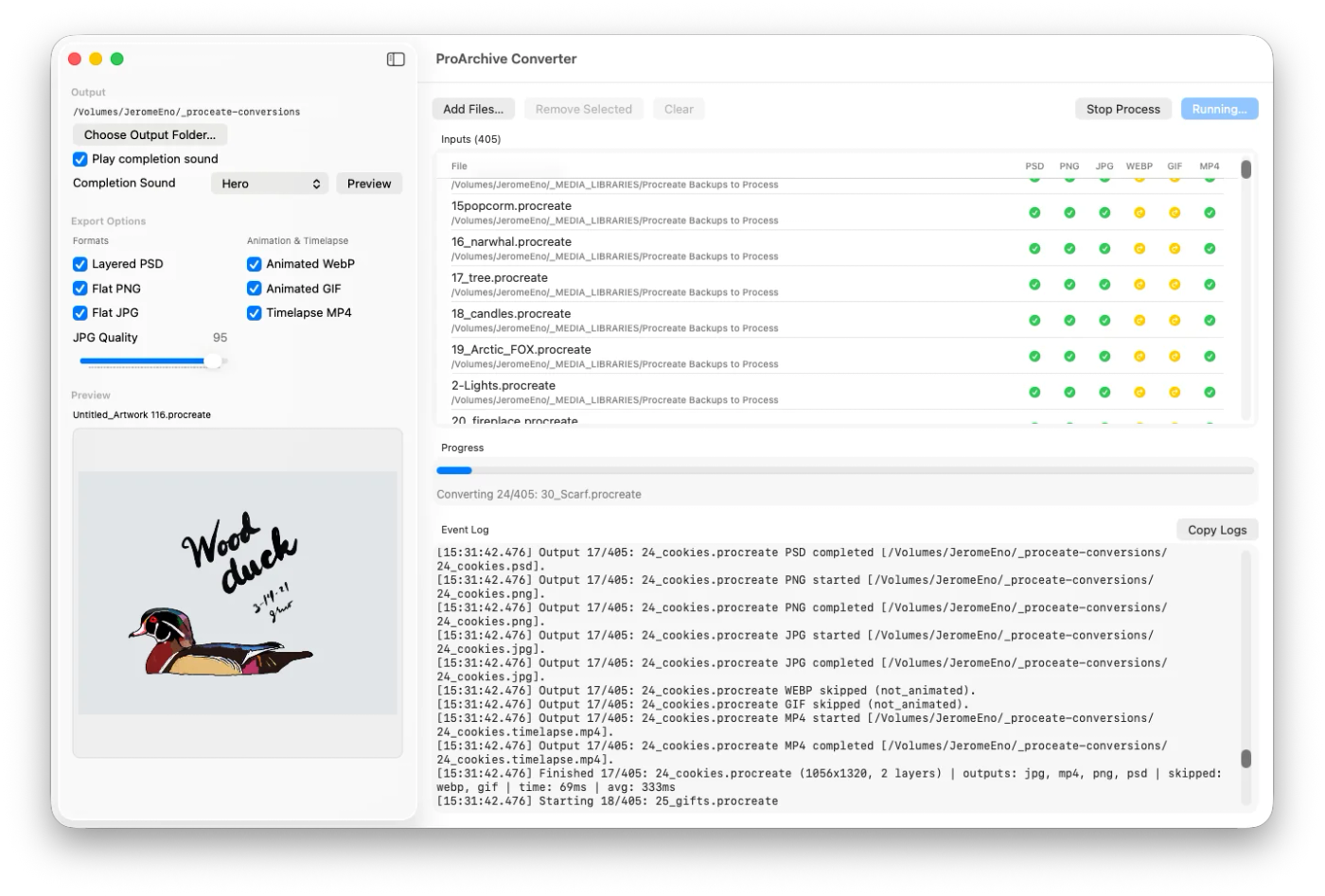
Convert .procreate archive files into layered PSDs, flat renders, animated exports, and stitched timelapse videos — all from the command line.
Key features
Preserves Layer Data
Maintains layer names, visibility, opacity, and common blend modes in PSD output.
Smart Backgrounds
Adds the Procreate background color as a bottom PSD layer by default.
Universal Formats
Exports flat PNG and JPG renders alongside layered PSDs.
Animation Support
Exports animated WebP and GIF when animation metadata is present.
Timelapse Stitching
Compiles internal replay segments into a single MP4 video.
Orientation Aware
Applies document orientation and flip metadata correctly.
Machine Readable
Supports JSON Lines logs for easy integration with other apps.
Bulk Processing
Powerful batch processing support with glob patterns.
Contact
Access + demo
About
Procreate doesn't make it easy to batch-export your work. If you want layered PSDs or flat renders from a folder of .procreate files, the usual answer is to open each one manually on an iPad. This tool skips all of that.
procreate-to-tif unpacks the Procreate archive format directly on macOS, reconstructs layers from LZO-compressed tile data, and writes out whatever you need: a layered PSD with blend modes and opacity intact, flat PNG or JPG renders, animated WebP or GIF when animation metadata is present, and a stitched timelapse MP4 from the replay segments Procreate stores internally.
Resources
Overview
Procreate doesn't make it easy to batch-export your work. If you want layered PSDs or flat renders from a folder of .procreate files, the usual answer is to open each one manually on an iPad. This tool skips all of that.
procreate-to-tif unpacks the Procreate archive format directly on macOS, reconstructs layers from LZO-compressed tile data, and writes out whatever you need: a layered PSD with blend modes and opacity intact, flat PNG or JPG renders, animated WebP or GIF when animation metadata is present, and a stitched timelapse MP4 from the replay segments Procreate stores internally.
Product Gallery